

Sites
Sites are the named locations where inventory exists at any given moment. A site might be a central warehouse, a temporary field staging area near an active project, a worker's personal inventory (created automatically when they receive their first QR pickup), or a vehicle carrying materials for a traveling crew. Every stock balance and movement is tied to a specific site, giving you a live view of where your materials are across your entire operation.
Site Types (Implicit)
Site Hierarchy:

Central Warehouse
├── Large capacity, controlled access
├── Staff with canFacilitatePickups permission
└── Primary receiving point (suppliers → warehouse)

Field Staging Sites
├── Temporary, project-specific
├── Medium capacity
└── Transfers from warehouse → consumption by workers

Personal Sites (Workers)
├── Auto-created on first QR pickup
├── Mobile inventory (follows worker)
└── Consumption transactions (work depletes stock)

Vehicle Sites
├── Reference to vehicle asset or operator
├── Mobile storage (traveling crews)
└── Stock moves with vehicle
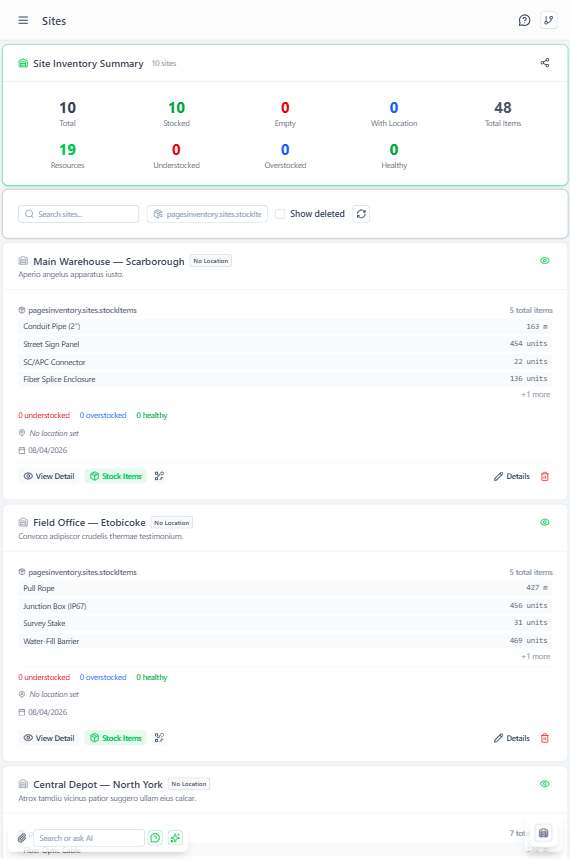 Sites page showing storage locations with types and capacity information
Aptli uses implicit site types based on fields present:
Physical Sites
Sites with geometry (GPS coordinates or area polygons):
- Central warehouses
- Regional distribution centers
- Field staging areas
- Storage yards
Example:
Name: "Central Warehouse"
Geometry: Point at (lat: 40.7128, lng: -74.0060)
Address: "123 Storage Way, New York, NY"
Personal Sites
Sites with reference to user or vehicle (no geometry):
- Individual worker inventory
- Vehicle inventory
- Mobile equipment
Example:
Name: "John's Personal Inventory"
Reference: { user_id: "..." }
This design avoids enum sync issues - the presence of geometry vs. reference determines implicit behavior.
Site Fields
Basic Information:
- Name - Descriptive name
- Type - Category for filtering (warehouse, field, vehicle, personal)
- Geometry - GPS coordinates or polygon area (optional)
- Reference - Link to user or vehicle (optional)
- Address - Physical address for warehouses
Inventory Tracking:
- Stock Items - Array of resources held at this site (managed via transactions)
- Capacity - Optional maximum volume/units (alerts when approaching limit)
Access Control:
- Authorized Personnel - Users who can create receipts/adjustments at this site
- Requires Supervision - If true,
canFacilitatePickupspermission required for transfers
Creating Sites
Physical Site:
- Navigate to Inventory → Sites
- Click "Add Site"
- Enter name, type, address
- Click map to set geometry (point or polygon)
- Set capacity if applicable
- Save
Personal Site (Auto-Created): When worker scans first pickup QR code:
- Personal site created automatically
- Named: "Worker Name's Personal Inventory"
- Reference set to worker's user ID
- No manual creation needed
Vehicle Site:
- Create site with reference to vehicle asset
- Or reference to user who operates vehicle
- Stock items track what's in vehicle
- Useful for mobile inventory (traveling crews)
Site Usage Patterns
Central Warehouse
- Purpose: Primary receiving and storage
- Characteristics: Large capacity, controlled access, fixed location
- Transactions: Receipts from suppliers, transfers to workers/field sites
- Staff: Warehouse managers with
canFacilitatePickupspermission
Field Staging Site
- Purpose: Temporary storage near active work area
- Characteristics: Medium capacity, project-specific, temporary
- Transactions: Transfers from warehouse, consumption by workers
- Lifecycle: Created for project, emptied when project completes
Personal Site (Worker)
- Purpose: Mobile inventory for individual
- Characteristics: Small capacity, moves with worker, worker-specific
- Transactions: Pickups via QR scan, consumption via reports, returns to warehouse
- Access: Only the worker can consume from their personal site
Vehicle Site
- Purpose: Inventory traveling with crew vehicle
- Characteristics: Medium capacity, moves with vehicle, crew-specific
- Transactions: Similar to personal site but for multi-person crews
- Tracking: Useful for compliance (what materials are on-site)
Site Transactions
View all activity at a site:
- Navigate to site detail view
- "Transaction History" shows:
- All receipts, transfers in/out, consumptions
- Current stock items and volumes
- Personnel who performed transactions
Helps answer:
- What inventory currently at this site?
- What left the site recently?
- Who received materials from this site?
GPS Tracking for Transfers
When QR pickup scanned:
- Each QR pickup scan records the GPS coordinates where it occurred
- If the site has a defined location, the system validates the worker was physically present
- The audit trail shows where each scan took place
- Helps detect unauthorized remote QR sharing
Geofence Validation (Optional): Configure warehouse to require scan within 50m radius
- Prevents remote QR scanning (screenshot sent to friend)
- Transaction rejected if GPS too far from site geometry
Stock Item Organization
Each site contains stock items:
Central Warehouse
  ├── Cat6 Cable: 500m
  ├── Mounting Brackets: 200 units
  └── Installation Kits: 15 units

John's Personal Inventory
  ├── Cat6 Cable: 10m
  └── Mounting Brackets: 5 units
Navigation:
- From site: view all stock items at this location
- From stock item: view which site holds this inventory
- Bi-directional relationship
Site Capacity Alerts
Set capacity limits to prevent overcrowding:
- Volume-Based: Total cubic meters/feet
- Weight-Based: Maximum kilograms/pounds
- Count-Based: Maximum number of units
When approaching capacity:
- Alert shown in site view
- Prevents additional receipts if over capacity
- Prompts redistribution to other sites
Best Practices
Name Consistently:
- Physical sites: Include location identifier (e.g., "Warehouse - NYC", "Field Site - Project Alpha")
- Personal sites: Auto-generated names work well ("Name's Inventory")
- Vehicle sites: Include vehicle ID (e.g., "Truck 42", "Van - License ABC123")
Use Geometry for Physical Sites:
- Enables proximity filtering (find nearest site with resource)
- Validates QR pickups (worker at correct location)
- Shows sites on map view
Limit Personal Site Creation:
- Only create when worker needs inventory accountability
- Not all users need personal sites
- Created automatically on first pickup (don't pre-create)
Audit Regularly:
- Review sites with zero stock items (unused sites)
- Archive field sites after project completion
- Reconcile personal sites during cycle counts