

System Settings
System settings control application-wide behaviour — who can register, how long sessions last, how long deleted records are retained, and what permissions new users start with. Settings are managed at Admin → App Settings and require the appSettingSchemasModify admin right.
Security Architecture
Aptli uses a four-layer security model with server-side rendering (SSR) enforcement:
Layer 1: Authentication
Who you are - verifies user identity before access.
- Password-based login (with complexity requirements)
- OAuth providers (GitHub, Google)
- Two-factor authentication (TOTP)
- Email validation required
- Session management with expiry
- Hard lock after failed attempts
Layer 2: Admin Rights (Permissive)
What you CAN modify - explicit permission grants.
- Create/update/delete permissions per model
- Super rights:
appSettingSchemasModify,adminRightsModify,viewDeleted - Scoped to actions (can create but not delete)
- Default: View-only access
Layer 3: Role Restrictions (Restrictive)
What you CANNOT see - field-level data filters.
- Model + field + comparison + value filters
- Applied server-side before database query
- Cannot bypass via API calls, exports, or screenshots
- Multiple restrictions combine (AND logic)
Layer 4: Server-Side Enforcement
Restrictions are enforced on the server — unauthorized data is never sent to your browser.
Why this matters:
- Client-side filtering: Data sent to browser, hidden with JavaScript (bypassable via dev tools)
- Server-side filtering: Data never sent to unauthorized users (secure)
Aptli enforces all filters on the server — unauthorized data never reaches the client.
Application Settings
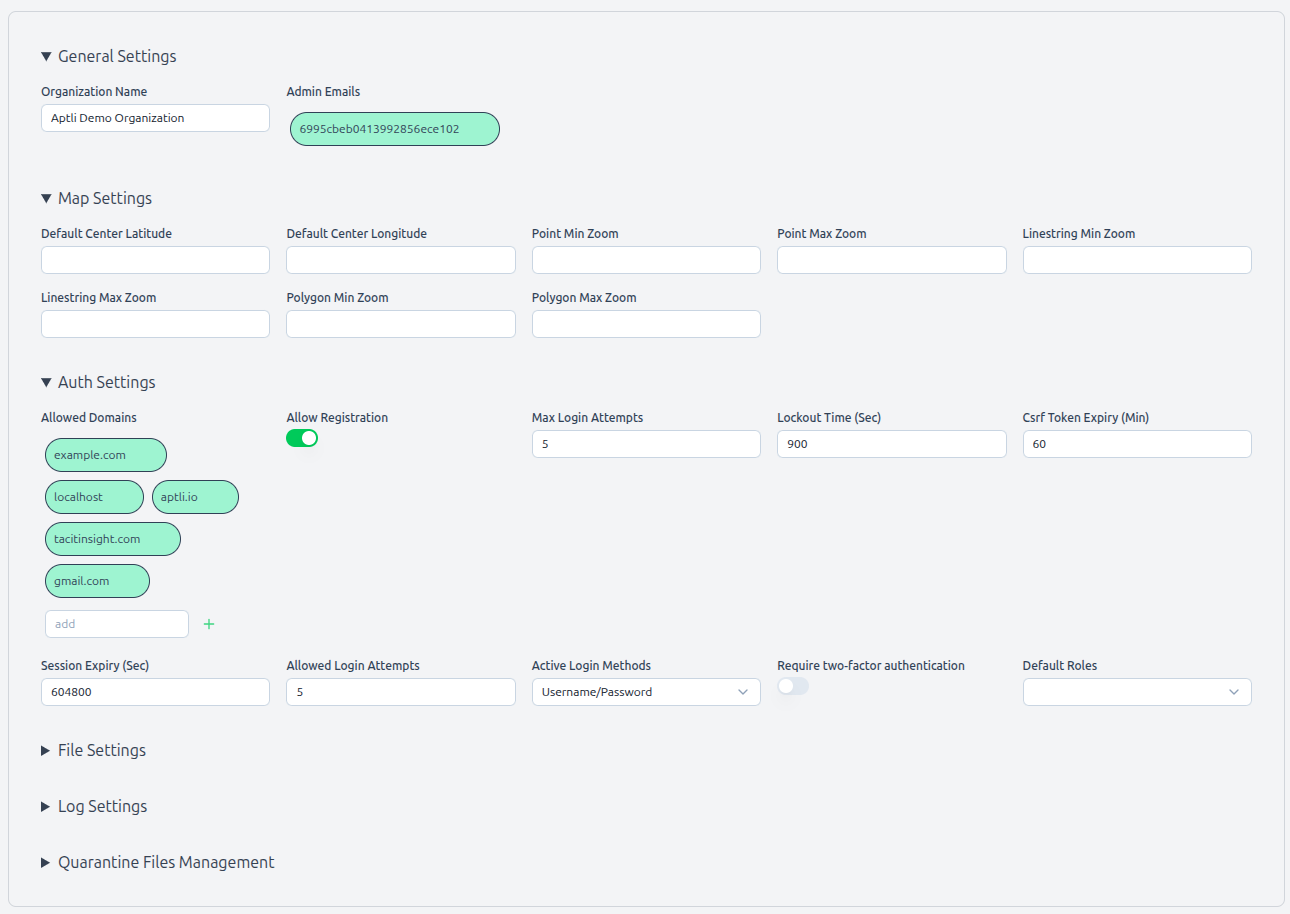 Application settings page showing configuration options and security parameters
Access Required: appSettingSchemasModify admin right
Navigate to: Admin → App Settings
Authentication Settings
Allowed Domains:
- List of email domains that can register accounts
- Example:
["company.com", "contractor.com"] - Only emails from these domains can sign up
- Default: Your deployment domain
Allow Registration:
true- Users can self-register if domain matchesfalse- Admin must manually create accounts- Default:
false(controlled access)
Active Login Methods:
- Username/Password (checkbox)
- GitHub OAuth (checkbox)
- Google OAuth (checkbox)
- At least one method must be enabled
- Default: Username/Password only
Require Two-Factor Authentication:
true- All users must enable 2FA (grace period configurable)false- 2FA optional- Default:
false
Session Security
Max Login Attempts:
- Number of failed logins before hard lock
- Valid range: 3-10 attempts
- Default:
5
Automatic Logout Time:
- Inactivity timeout in seconds
- Reading/writing data resets countdown
- Valid range: 1 hour - 7 days
- Default:
86400(1 day)
Server Session Timeout:
- Server session timeout in minutes
- Forces re-login regardless of activity
- Valid range: 1 hour - 4 weeks
- Default:
10080(1 week)
Session Expiry:
- Absolute maximum session duration
- Aligns with CSRF token for single-device users
- Multi-device users may have different expirations
- Default:
10080minutes (1 week)
Data Retention
Soft Delete Retention:
- How long soft-deleted records stay in database
- Options: 30 days, 90 days, 1 year, indefinite
- Default:
90 days - Applies to assignments, reports, users, features (when deletedAt set)
Version Compression Schedule:
- How often to compress old feature versions
- Options: Weekly, Monthly, Quarterly
- Default:
Monthly - Compressed versions still reconstructible (lossless compression)
Transaction History:
- Inventory transactions never deleted (immutable audit trail)
- Can be archived to separate database (advanced configuration)
New User Defaults
Roles for New Users:
- Array of role IDs auto-assigned
- Empty array = no automatic restrictions
- Default:
[](admin assigns manually)
Admin Rights for New Users:
- Array of permission right strings
- Empty array = view-only access
- Default:
[](no write permissions)
Example Configurations:
Field Worker Defaults:
{
  "roles": ["field_worker_role_id"],
  "adminRights": ["reportsCreate"]
}
Office Coordinator Defaults:
{
  "roles": [],
  "adminRights": ["assignmentsCreate", "ordersCreate", "stockItemsView"]
}
Self-Hosted Deployment
For self-hosted deployment instructions, see the System Administrator Guide.
Security Best Practices
SSL/TLS Required:
- Use HTTPS in production (not HTTP)
- Free certificates: Let's Encrypt
- Refuse HTTP connections (redirect to HTTPS)
Firewall Configuration:
- Allow: HTTPS (443), SSH (22)
- Deny: database ports from the public internet
- Restrict: Admin pages to VPN or IP allowlist
Session Security:
- Session signing keys should be long, random, and rotated quarterly
- Use short session expiry in high-security environments
- See the Deployment Guide for server-side session configuration
Database Security:
- Database authentication enabled
- Separate user credentials (not root)
- Encrypted database connections
- Regular backups (automated, tested restoration)
OAuth Secrets:
- Store in environment variables (not in code)
- Rotate quarterly
- Revoke unused OAuth apps
File Upload Security:
- File scanning enabled in production
- File size limits enforced
- Allowed file types restricted
- Storage quarantine for suspicious files
Monitoring:
- Failed login attempts (detect brute force)
- Authorization failures (detect unauthorized access attempts)
- Unusual API usage patterns
- Database connection failures
Compliance Considerations
Data Residency: Self-hosted mode allows control of data location:
- Host in specific geographic region
- Meet regulatory requirements (GDPR, HIPAA, etc.)
- Control data access physically
Audit Trail: Aptli maintains audit trails for:
- Authentication attempts (success/failure)
- Admin right usage (who modified what)
- Role restriction changes
- Transaction history (inventory movements)
- Version history (feature changes)
- Soft deletes (who deleted what, when)
Data Export: All data exportable for compliance:
- CSV export for non-geo data
- GeoJSON export for features (via the Data Transfer button on the map toolbar)
- Transaction reports (inventory audit)
- User access logs
Data Retention: Configurable retention policies:
- Soft delete retention period
- Version compression (lossless)
- Transaction history (immutable - never deleted)
- Audit logs (configurable archival)